Create Your Real Estate Website
on WordPress — For Free
ImoBI Lite gives you everything to publish properties, capture leads and start selling — right now, at zero cost.
v1.1.3 · 91KB · Works with any WordPress theme · No coding required
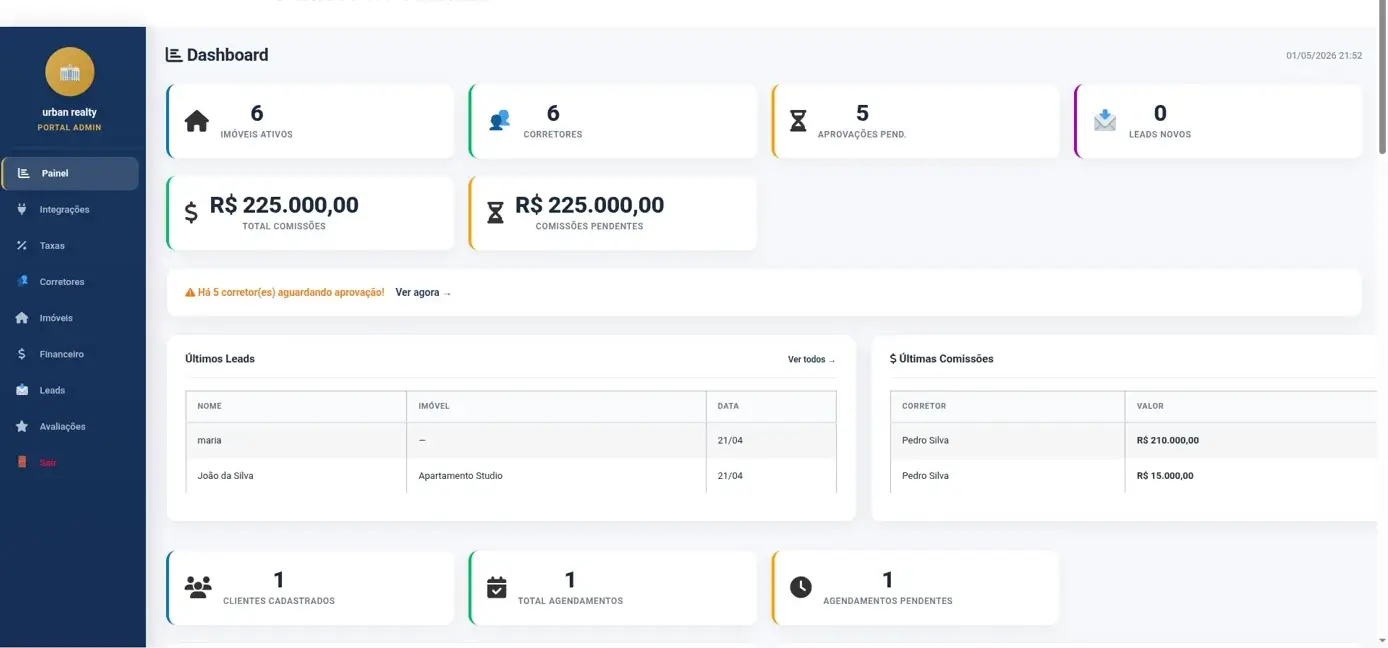
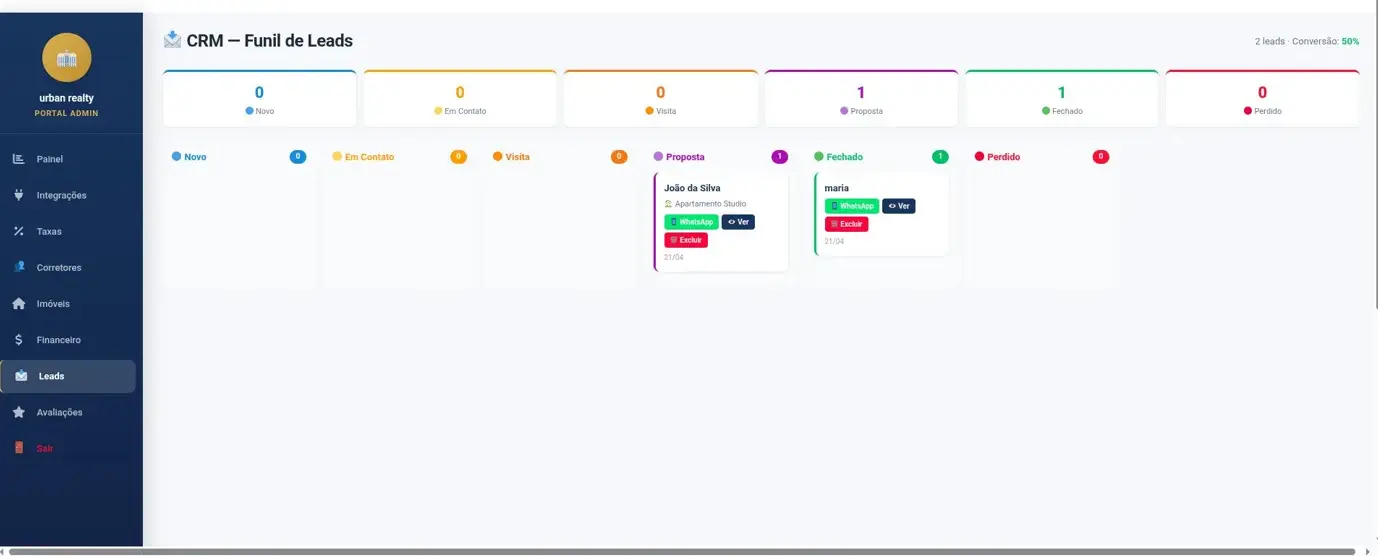
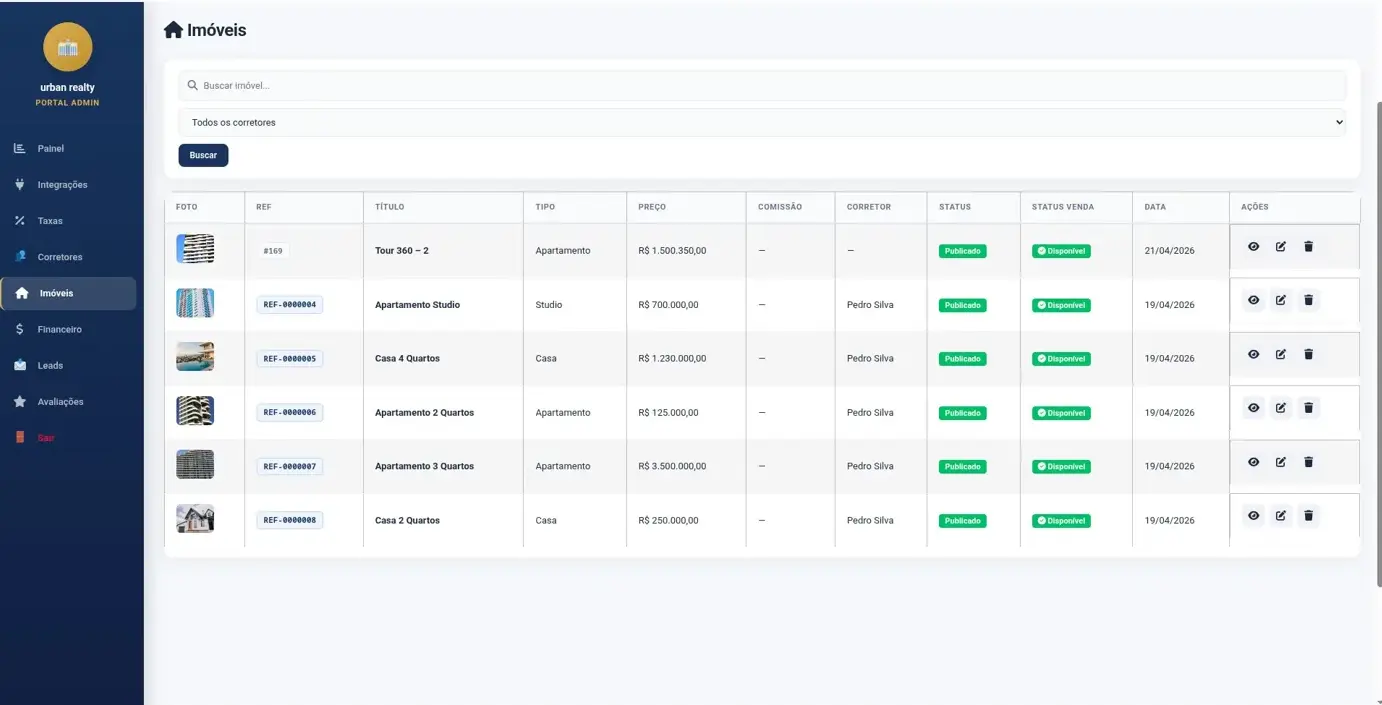
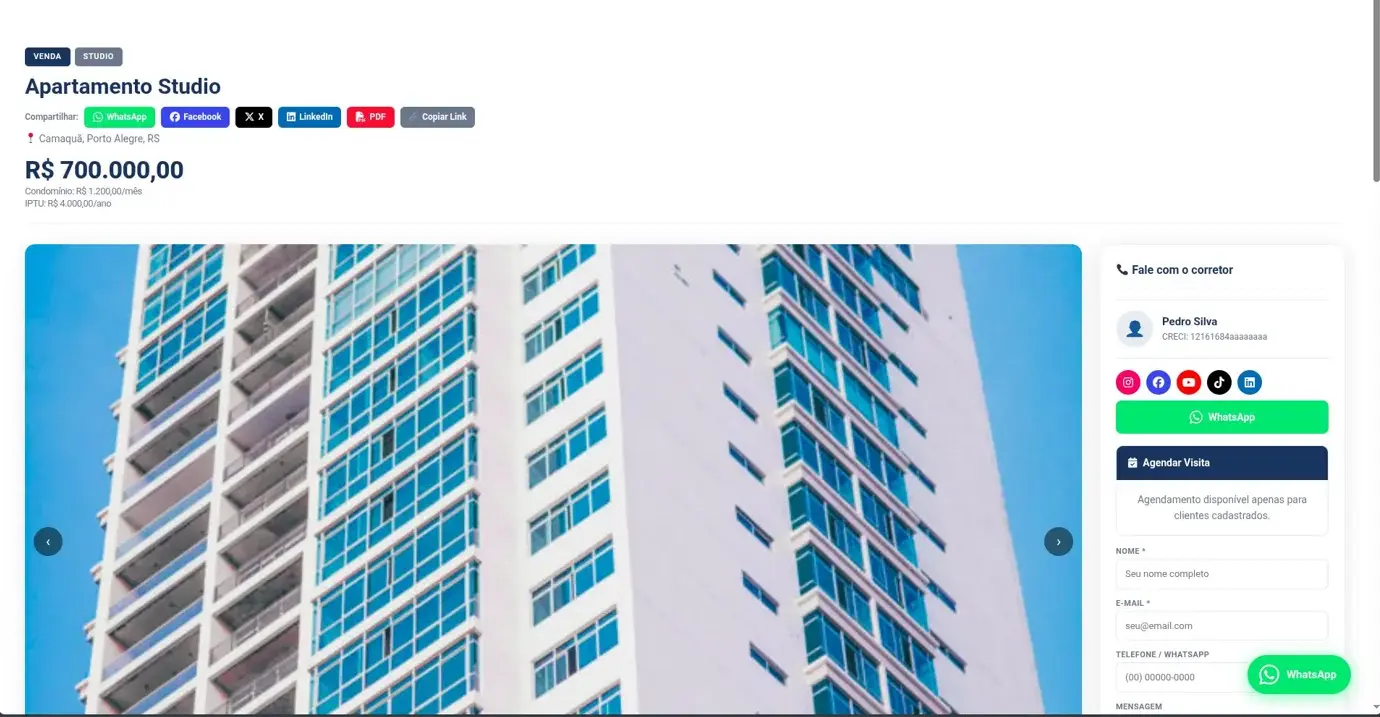
⚡ Everything in Lite — Free
ImoBI Lite gives you a solid real estate website. When you're ready to run a brokerage, ImoBI Pro takes it all the way.
Property Listings
Responsive 1–4 column grid. Filter by type, city, price and bedrooms.
Search & Filters
Inline search form with URL parameters. Works with any listing page.
Slider / Carousel
Property carousel with arrows, dots and autoplay for homepage sections.
Favorites (No Login)
Heart button saves in cookie for 30 days. No account needed.
Interactive Map
OpenStreetMap by default — free, no API key needed. Optional Google Maps with your own key.
Contact Form + Leads
Lead capture on every property. All saved in Properties → Leads.
reCAPTCHA v3
Protect forms from spam bots. Add your Google keys in Settings.
Auto REF Codes
Sequential codes auto-generated (REF-0000001). Configurable prefix.
Custom Primary Color
Change buttons, badges and highlights to your brand color in one click.
Schema.org SEO
Automatic structured data for rich results in Google search.
Auto Updates
New versions notify you in WP dashboard. Update with one click.
Need broker portals, CRM lead funnel, commissions and ZAP/VivaReal integration?
⭐ See ImoBI Pro →🚀 Installation
Download the plugin
Click Download Free at the top of this page to get the ZIP file.
Upload to WordPress
Go to WP Admin → Plugins → Add New → Upload Plugin and select the ZIP.
Activate
Click Activate Plugin. A new Properties menu appears in your dashboard.
Create a listings page
Create a page, add [imobi_listing], publish and start adding properties.
Recommended themes: Works with any theme. Best with Hello Elementor, Astra or Kadence.
🏠 Adding Your First Property
Go to Properties → Add New Property. Fill in the details and publish.
| Field | Description |
|---|---|
| Title | Property name (e.g. "3 Bedroom Apartment Downtown") |
| Price + Currency | Numeric price with 19+ currency options |
| REF / Code | Leave blank for auto-generation (e.g. REF-0000001) |
| Bedrooms / Bathrooms / Parking | Number of rooms |
| Total / Built Area | Area in m² |
| Address + Lat/Lng | For map display — get coordinates from Google Maps |
| Photo Gallery | Multiple photos with slider on the property page |
| Agent Name / Phone | Shown in contact sidebar with WhatsApp button |
| Featured | Check to include in [imobi_featured] shortcode |
Want brokers to submit and manage their own listings from a frontend dashboard?
⭐ ImoBI Pro has it →⚙️ Settings
Go to Properties → Settings to configure the plugin globally.
| Setting | Description | Default |
|---|---|---|
| Default Currency | Fallback currency when none set on the property | USD |
| Properties per Page | Properties shown per page in listings | 12 |
| REF Prefix | Prefix for auto-generated reference codes | REF |
| Primary Color | Color for buttons, badges and highlights | #0b1628 |
| Google Maps API Key | Optional. If set, replaces the default OpenStreetMap with Google Maps | — |
| Send leads to | Email for contact form notifications | Admin email |
| reCAPTCHA Site Key | Public key from Google reCAPTCHA v3 | — |
| reCAPTCHA Secret Key | Secret key — never shared publicly | — |
⚡ All 7 Shortcodes
Property Grid
Main shortcode. Filterable grid with columns, sorting and URL-based filters.
Search Form
Filter form. Place above [imobi_listing] on the same page.
Slider / Carousel
Property carousel with arrows, dots and optional autoplay.
Featured Properties
Shows only Featured properties. Great for homepage highlights.
Saved Properties
Shows all properties the visitor favorited with ❤️.
Interactive Map
OpenStreetMap by default — free, no API key needed. Optional Google Maps with your own key.
Contact Form
Lead form with WhatsApp. Auto-included on single property pages.
📋 [imobi_listing]
[imobi_listing]
[imobi_listing show_sort="yes" columns="2"]
[imobi_listing listing_type="for-sale" property_type="apartment"]
[imobi_search]
[imobi_listing status=""]| Parameter | Description | Default |
|---|---|---|
| columns | Grid columns: 1, 2, 3 or 4 | 3 |
| per_page | Properties per page | 12 |
| show_sort | Sort bar yes/no — Latest, Price ↑↓, Name A-Z | no |
| listing_type | Slug: for-sale, for-rent, short-term | — |
| property_type | Slug: apartment, house, land... | — |
| city | City slug | — |
| status | Status slug. Empty = all | available |
| featured | 1 = featured only | — |
| orderby | date, title, menu_order | date |
| order | ASC or DESC | DESC |
Place [imobi_search] above [imobi_listing] on the same page — filters work automatically via URL parameters.
🔍 [imobi_search]
[imobi_search]
[imobi_listing]

[imobi_search show_price="no" show_beds="no"]
🎠 [imobi_slider]
[imobi_slider columns="3" autoplay="4000"]
[imobi_slider featured="1" columns="2"]| Parameter | Description | Default |
|---|---|---|
| columns | Visible cards: 1, 2, 3 or 4 | 3 |
| per_page | Total properties to load | 6 |
| autoplay | Interval ms. 0 = disabled | 0 |
| listing_type | Filter by slug | — |
| featured | 1 = featured only | — |
⭐ [imobi_featured]
Shows only properties marked as Featured. Shortcut for [imobi_listing featured="1"].
[imobi_featured per_page="6" columns="3"]Mark a property as Featured by checking "Featured Property" in the Agent / Contact sidebar when editing.
❤️ [imobi_favorites]
Shows properties the visitor saved with ❤️. Stored in cookie for 30 days. No login needed.
[imobi_favorites]Create a "Saved Properties" page with this shortcode and add it to your menu so visitors can find their saved properties.
🗺 [imobi_map]
Interactive map with all properties as clickable markers — uses OpenStreetMap by default, free with no API key required. Add a Google Maps API Key in Settings to switch to Google Maps.
[imobi_map]
[imobi_map height="600" zoom="14"]
[imobi_map listing_type="for-sale"]| Parameter | Description | Default |
|---|---|---|
| height | Map height in pixels | 450 |
| zoom | Zoom level 1–20 | 12 |
| per_page | Max properties on map | 50 |
| listing_type | Filter by slug | — |
| status | Filter by status | available |
📩 [imobi_contact]
Lead capture form with WhatsApp button. Auto-included on single property pages.
[imobi_contact property_id="42"]
[imobi_contact]
Need lead assignment to brokers, Kanban CRM and automated WhatsApp follow-up?
⭐ ImoBI Pro has it →🎨 CSS Variables
Override in Appearance → Customize → Additional CSS or use the Primary Color picker in Settings.
:root {
  --imobi-primary: #0b1628; /* or use Settings color picker */
  --imobi-accent:  #d4a853; /* featured border */
  --imobi-radius:  12px;     /* card corners */
  --imobi-shadow:  0 4px 20px rgba(0,0,0,0.08);
  --imobi-border:  #e0e6ed;
  --imobi-muted:   #6c7a8d;
}Lite covers design. Pro adds custom fields, advanced search builders and broker portals.
⭐ See Pro →✏️ CSS Examples
Square cards
:root{--imobi-radius:0}Taller card images
.imobi-card-thumb,.imobi-card-thumb img{height:280px!important}4 columns on large screens
@media(min-width:1200px){.imobi-grid{grid-template-columns:repeat(4,1fr)!important}}Glassmorphism badge
.imobi-type-badge{background:rgba(0,0,0,.6)!important;backdrop-filter:blur(4px)!important;border-radius:20px!important}📄 Template Override
Copy plugin templates into your theme to fully customize them.
mkdir -p wp-content/themes/your-theme/imobi-lite/
cp wp-content/plugins/imobi-lite/public/templates/single-property.php \
   wp-content/themes/your-theme/imobi-lite/
cp wp-content/plugins/imobi-lite/public/templates/archive-property.php \
   wp-content/themes/your-theme/imobi-lite/
Need a full-featured frontend broker dashboard without touching any template?
⭐ ImoBI Pro has it →🧩 WordPress Widgets
Go to Appearance → Widgets to find 2 ImoBI widgets for any sidebar:
ImoBI — Property Listings
Compact list with thumbnail, title, city and price. Configure count and type filter.
ImoBI — Property Search
Search form with type, city and bedrooms. Choose which page shows results.
⚖️ Lite vs Pro
Lite gets your property site live. Pro turns it into a real estate business operation.
| Feature | 🆓 Lite | ⭐ Pro |
|---|---|---|
| Property listings, search & filters | ✓ | ✓ |
| Slider / Carousel | ✓ | ✓ |
| Favorites (no login) | ✓ | ✓ |
| Social Share (WhatsApp, Facebook, X, LinkedIn) | ✕ | ✓ Pro |
| Interactive Map (OpenStreetMap) | ✓ | ✓ |
| Google Maps (optional, own API key) | ✓ | ✓ |
| Contact form + basic leads | ✓ | ✓ |
| reCAPTCHA v3 | ✓ | ✓ |
| Auto REF codes | ✓ | ✓ |
| Custom primary color | ✓ | ✓ |
| Schema.org SEO | ✓ | ✓ |
| 19+ currencies | ✓ | ✓ |
| WordPress sidebar widgets | ✓ | ✓ |
| Auto updates | ✓ | ✓ |
| Broker frontend portal | ✕ | ✓ Pro |
| CRM — Lead Funnel (Kanban) | ✕ | ✓ Pro |
| Multi-broker + commissions | ✕ | ✓ Pro |
| ZAP / VivaReal / OLX XML feed | ✕ | ✓ Pro |
| Tour Virtual 360° | ✕ | ✓ Pro |
| PDF Brochures | ✕ | ✓ Pro |
| Appointment scheduling | ✕ | ✓ Pro |
| 10 languages included | ✕ | ✓ Pro |
| Priority support | ✕ | ✓ Pro |
❓ FAQ
My properties don't show on the listing page
By default [imobi_listing] shows only Available status. To show all: [imobi_listing status=""].
The grid looks broken with my theme
Add to Appearance → Customize → Additional CSS:
.imobi-grid{max-width:100%!important;width:100%!important}How do I set up Google Maps?
Go to Properties → Settings, add your API Key, then set Latitude and Longitude on each property. Get a free key at console.cloud.google.com.
How does the favorite button work?
The ❤️ saves property IDs in a browser cookie — no login needed. Create a page with [imobi_favorites] and visitors can view saved properties for 30 days.
Can I add custom fields?
Not in Lite. ImoBI Pro supports unlimited custom fields and taxonomies.
From a property site
to a real estate operation
Lite publishes your listings. Pro runs your brokerage — brokers, leads, commissions, appointments and everything in between.